Quick Start Guide
In this section, you will learn how to use CodeSecTools.
This guide mainly used the tool on Java projects, it is perfectly possible to run it on any project that language is supported.
1. Prerequisites
Local installation
-
You will need to install the following packages:
gitcloc- Java Development Kit (17)
maven
-
And the following SAST tools:
Docker container
CodeSecTools can start a Docker container with some SAST tools (free and open-source) and packages installed.
You still need to install CodeSecTools normally and then invoke the CLI command to start the Docker container. There is no a Docker image that you can pull and run directly for the following reasons:
- CodeSecTools source code is copied locally and then installed in the Docker image
- UID and GID of the current user is gathered at build time to fix mounted volume permission issues
2. Installation
-
Clone the repository:
-
Install the project:
3. First run
Docker container
You can start a Docker container to run CodeSecTools to analyze the current directory:
Use --isolation flag to start Docker container without networking, make sure to download external resources on the host (which has internet connexion) before.
Only the following directories are mounted in the Docker container:
$TARGET_DIR(your source code directory)~/.codesectools(your CodeSecTools data, in particular storing the analysis result)
Install completion (optional)
Completion is already installed in the Docker container.
Download external resources
This command downloads datasets, rules, and plugins required for the SAST tools.
For each external resource, you will be prompted with resource information and, most importantly, its license/term.
Check the integration status
This command allows you to check if a SAST tool or dataset is available.
If not, it will specify what is missing.
For this guide, the status for Bearer, SemgrepCE, and SpotBugs should be Full ✅.
4. Common Use Cases
Analysis with multiple SAST tools
One important feature of CodeSecTools is the ability to run multiple SAST tools in order to:
- aggregate all the results to take advantage of each SAST tool's strengths (detecting specific vulnerabilities);
- cross-verify results and increase the confidence that a finding is a true positive.
Here are some analyses running CodeSecTools on vulnerable projects:
cyclonedx-core-java (CVE-2025-64518)
Vulnerability details are from Github Advisory.
- Weakness: CWE-611 (Improper Restriction of XML External Entity Reference).
- Introduced in commit 162aa59.
- Patched in pull request #737.
- Vulnerable file:
src/main/java/org/cyclonedx/CycloneDxSchema.java.
Download the vulnerable version of the project:
git clone https://github.com/CycloneDX/cyclonedx-core-java
cd cyclonedx-core-java
git checkout 162aa59
Compile the project to generate Java bytecode for SAST tools that require it:
Run analysis with all SAST tools:
Generate figures and report:
Open the project report (~/.codesectools/output/AllSAST/cyclonedx-core-java/report/home.html).
The report of the vulnerable file is shown here:
Some issues have been found by the tools in the vulnerable file, and the file is ranked high (high score) overall among all other files where issues were found.
SpotBugs is the only tool that detected issues and correctly identified the vulnerability (exact CWE ID).
conductor (CVE-2025-26074)
Vulnerability details are from Github Advisory.
- Weakness: CWE-78 (Improper Neutralization of Special Elements used in an OS Command ('OS Command Injection')).
- Patched in commit e981650.
- Vulnerable file:
core/src/main/java/com/netflix/conductor/core/events/ScriptEvaluator.java. - Note: the patch did not modify the vulnerable file but other files, which attenuated the vulnerability.
Download the vulnerable version of the project:
Compile the project to generate Java bytecode for SAST tools that require it:
Run analysis with all SAST tools:
Generate figures and report:
Open the project report (~/.codesectools/output/AllSAST/conductor/report/home.html).
The report of the vulnerable file is shown here:
Only one issue has been found by the tools in the vulnerable file, and the file is ranked low (low score) overall among all other files where issues were found.
SemgrepCE is the only tool that detected issues and partially identified the vulnerability.
It has detected a code injection that could leads to an OS command injection.
Note: If we did not know that a vulnerability existed, we would have had to verify it (by attempting to exploit it) because the eval function is a feature.
Benchmarking SAST tool
It is possible to benchmark any SAST tool on any dataset that are integrated to CodeSecTools thanks to the prior integration:
If the SAST tool requires artifacts, the expected artifacts and build command are provided:
cstools spotbugs benchmark BenchmarkJava_java
╭──────────────────────── SpotBugs - PrebuiltSAST ────────────────────────╮
│                                                                         │
│ Please build BenchmarkJava before running the benchmark                 │
│ Build command:          mvn clean compile                               │
│ Full command:           (cd                                             │
│ /home/michel/.codesectools/cache/BenchmarkJava && mvn clean compile)    │
│ Expected artifacts:                                                     │
│ /home/michel/.codesectools/cache/BenchmarkJava/target/classes/org/owasp │
│ /benchmark/testcode/*.class                                             │
╰─────────────────────────────────────────────────────────────────────────╯
Then generating figures using the analysis output:
cstools spotbugs plot BenchmarkJava_java --overwrite
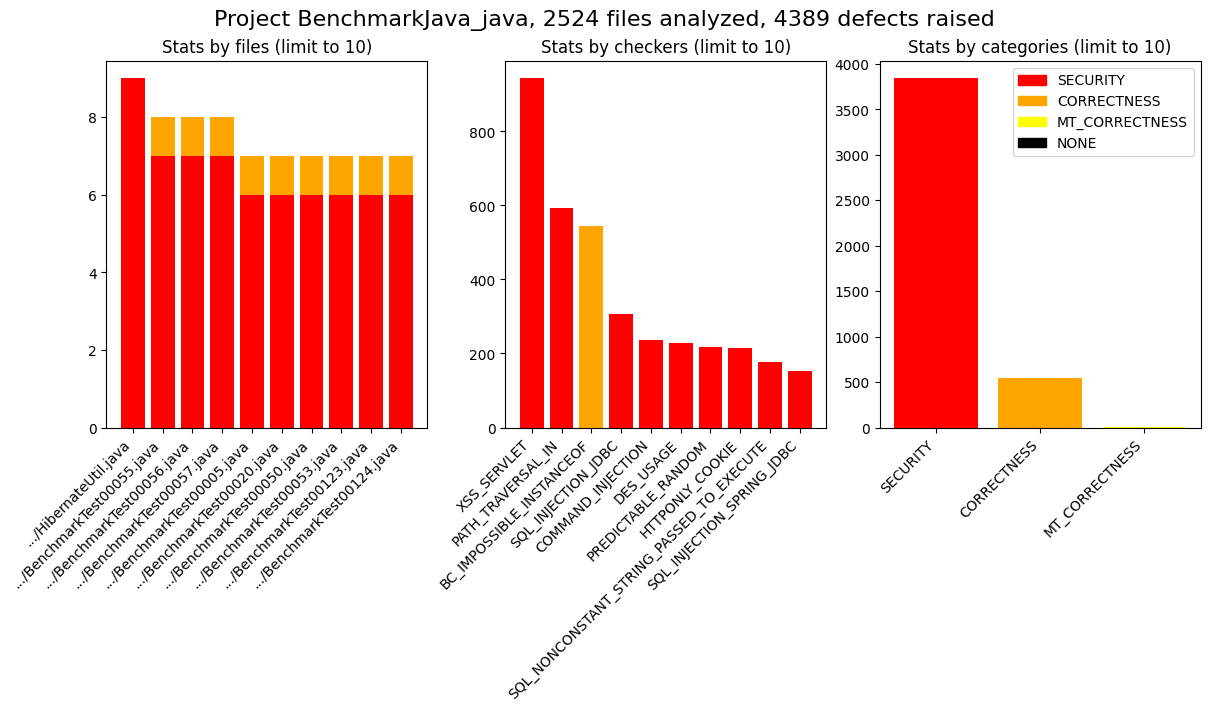
Figure overview saved at /home/michel/.codesectools/output/SpotBugs/BenchmarkJava_java/_figures/overview.png
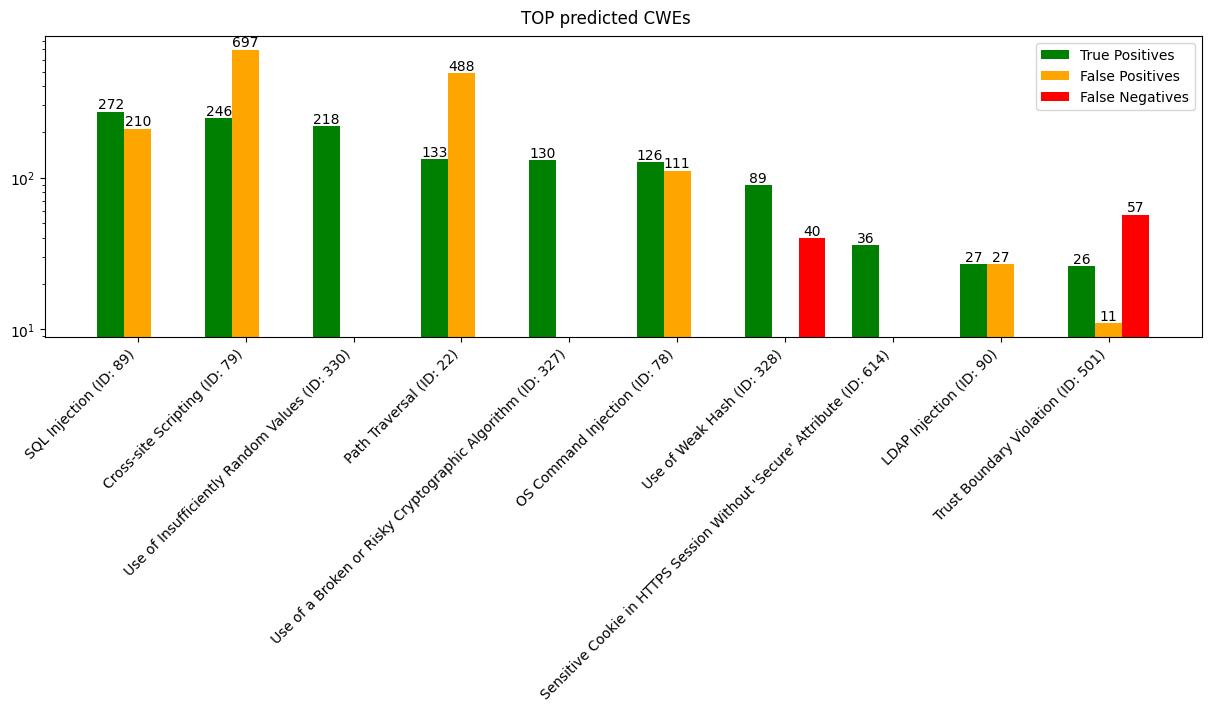
Figure top_cwes saved at /home/michel/.codesectools/output/SpotBugs/BenchmarkJava_java/_figures/top_cwes.png
Figures: